Intro
Obsidian tasks have traditionally lived inside notes as checkboxes. Write an action, place - [ ] in front of it, and move on with your day.
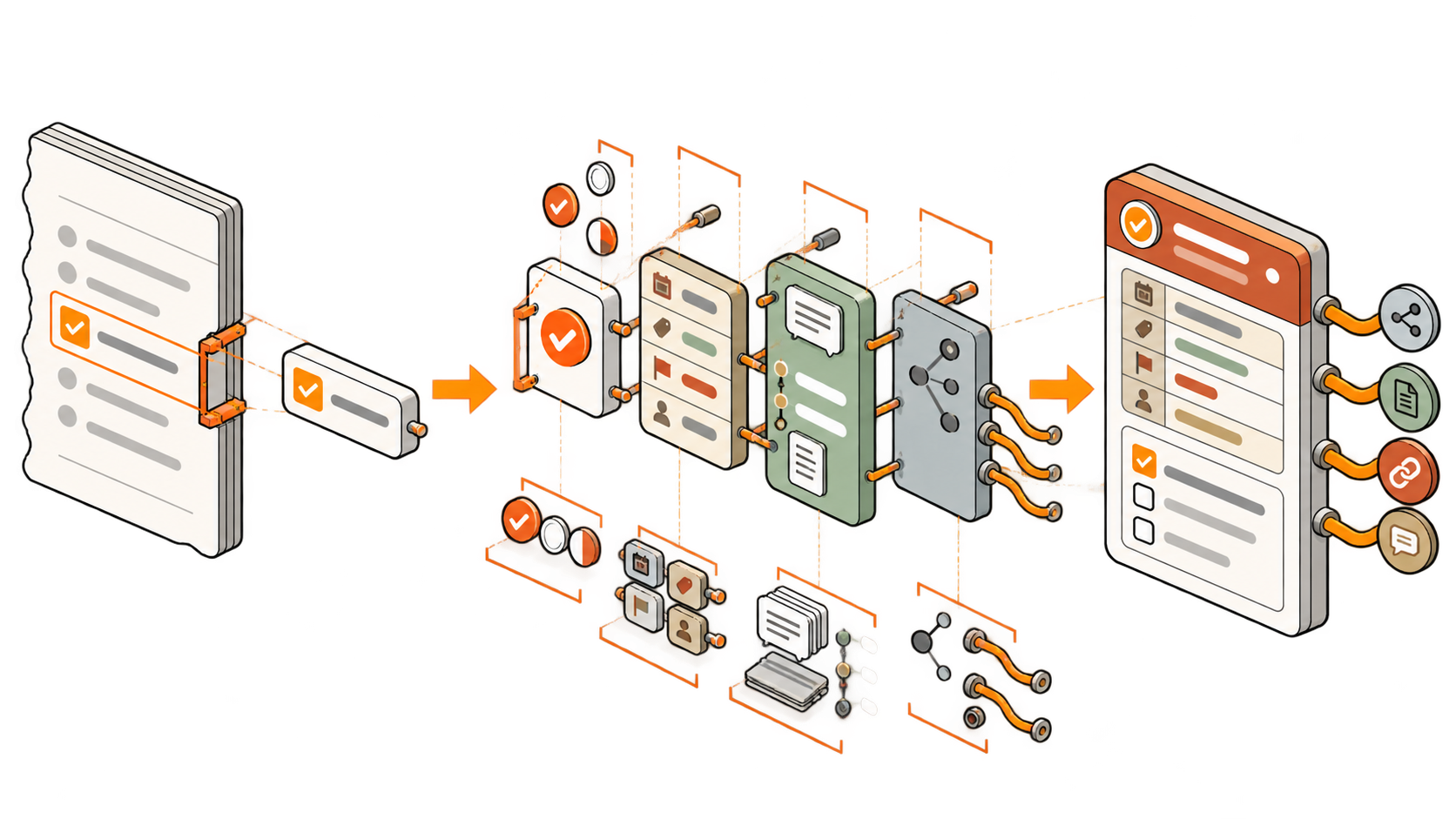
The growing interest in TaskNotes points towards a richer model: the task itself becomes a Markdown note, complete with properties, links and enough room for working context. It is a small technical change with rather large consequences. A checkbox can now become a fully fledged citizen of your vault.
But once every action can have its own note, a dangerous question appears:
Should every action have one?
No. Unless, of course, you have always wanted “Put detergent in washing machine” to have its own status, dependencies and carefully preserved life story.
In the preceding article, Checkboxes and Task Notes: Two Ways to Represent Work in Obsidian, I distinguished between two ways of representing work: a checkbox borrows its meaning and management information from the note around it; a task note gives a piece of work an identity of its own.
That distinction raises the practical question for this article: When is a checkbox enough, and when should an action become a task note?
In my more than ten years as a project manager, I have tried quite a few ways of capturing, categorizing and retrieving tasks. Some produced clarity. Others mostly produced tasks about managing tasks. The most useful lesson was that the right representation depends less on how large an action is than on how independently it must be managed.
The rules
Simplicity can be complicated
The basic rule is simple:
Use a checkbox while an action can inherit its context, status and relationships from the note around it. Create a task note when the action needs to be managed independently.
This means that size is often the wrong criterion.
“Send approval request” may take only two minutes, yet deserve a task note because the response can take two weeks, block other work and require a follow-up. “Rewrite the introduction,” meanwhile, may occupy an entire afternoon and still work perfectly well as a checkbox inside the article’s current drafting task.
The question is not merely: How much work is this?
The better question is: Does this work need an identity of its own?
Even though the function of checks and tasks is rather clear, the destinction of when to create what is not.
Why not every action should become a task note
A task note offers more room and more control, but that control is not free. Every note must be created, named, classified, linked, maintained and eventually completed or archived. One task note adds very little overhead. A few thousand little sovereign task republics add rather more.
The main cost is not storage space. Plain-text Markdown files are tiny, and your drive will probably survive. The scarcer resources are attention and navigability.
Too many task notes can:
- clutter search results and task views;
- make the relevant work harder to find;
- fragment a coherent workflow across many files;
- create repeated properties and links;
- turn task maintenance into a task of its own.
The goal is therefore not to create as few task notes as possible. Nor is it to grant every action its own file at birth. The goal is to use the least complex representation that can hold the work reliably.
When a checkbox is enough
A checkbox is sufficient when the action can remain a local part of a larger piece of work.
The action is unambiguous
A good checkbox can be understood from one line. Another person or future you—returning after a hiatus—should know what to do without reconstructing the circumstances like an archeologist working themselves through countless manuscripts of old.
- [ ] Add the comparison table to the articleThis action is clear if the checkbox sits inside the article’s task note and the intended table is already described there. If “the comparison table” could refer to three different tables, requires another source or comes with open design decisions, the line is no longer carrying the work reliably.
The action is a local step in a larger workflow
Checkboxes are excellent for small, atomic steps whose main relationship is with the step immediately before or after them.
## Draft article

- [x] Review the existing notes
- [ ] Create the outline
- [ ] Draft the introduction
- [ ] Add examples
- [ ] Proofread the article
The steps form one sequence. They share the same objective, working context and responsibility. Turning every line into a separate note would not make the workflow more manageable; it would merely distribute it across five places.
The action shares the surrounding task’s properties
A checkbox inherits all the properties (e. g. project, status, deadline, priority or responsible person) of its task note. As long as none of those properties differs, there is little reason to repeat them in another file.
Suppose I begin with a task note named • Draft article (I prefix my task-note titles with • because it makes them easy to search for and recognize).
If drafting and publishing happen in the same work session and share the same relevant properties, I can rename the note to • Write and publish article and organize both parts beneath separate headings. Headers exist for a reason, after all, and titles are not carved into granite.
If publishing later gets its own date, graphics, reviewer or follow-up actions, it has crossed a management boundary and can become a task note of its own.
The action stays inside the current work session
Actions that arise and disappear within an active session rarely need independent administration. If I am already editing the article and notice that one paragraph needs shortening, a checkbox in the current task note is enough.
Not every action needs to survive lunch.
If I expect to stop, switch projects or forget why the paragraph needed shortening in the first place, the situation changes. Then the action needs enough context to survive without my working memory; especially since working memory is not known for its generous long-term warranty [§ Carpenter 1990, § Cowan 2012].
The action becomes irrelevant once completed
Some actions only matter until they are done. Their result is visible elsewhere, and no one will later need their history, decisions or supporting information.
Once I have added detergent, the washing machine contains detergent. If I vacuumed the floor, its cleanliness is record enough of my work (or at least should be).
A checkbox can record that fact. A dedicated note would mostly preserve a gripping but unnecessary administrative biography.
When to create a task note
A task note becomes useful as soon as an action needs its own lifecycle, context or relationships. The following signals indicate that the action should be promoted from a local check to an independently manageable piece of work.
The action needs more than open and done
At its simplest, a checkbox is binary: the action is open or completed. Custom checkbox states can stretch that model, but once an action must be managed independently as in progress, waiting, blocked, delegated or under review, an explicit status property becomes much more reliable.
Consider “Request approval from the client.” Sending the request is one step. Waiting for the response is another state. The work may then become blocked, require a reminder or return with requested changes. A two-minute action has acquired a lifecycle. That lifecycle deserves a task note.
The action must survive an interruption
Interruptible work benefits from a persistent place that records:
- what has already been done;
- what changed along the way;
- which questions remain open;
- what should happen next.
This turns the task note into a save point. Instead of loading the entire problem back into your head, you can return to the latest recorded state and continue from there, reducing friction and improving productivity [§ Kersten 2006].
I often create a fresh task note for a distinct work session when that session has its own intended outcome. At the beginning, I write down at least a rough plan. During the session, its checkboxes and comments capture progress. At the end, I leave the next actionable step.
This is a guideline rather than a religious observance. A coffee refill does not constitute a new work session, however transformative it may feel.
The action requires supporting information
An action should become a task note when its title is no longer enough to start or resume the work. Supporting information may include:
- background and purpose;
- links to relevant objects or sources;
- correspondence and meeting notes;
- files, screenshots or examples;
- open questions and assumptions;
- a short working log.
If a checkbox slowly grows into a paragraph with three nested bullets, two links and an apology to your future self, it is begging for note status.
The action accumulates progress or decisions
Some work produces information while it is being performed. Options are evaluated, assumptions change, partial results appear and decisions are made. That information is part of the work and may remain useful after the action is complete.
A task note gives that developing history a stable home. It can preserve not only that something was done, but how the result came about and why a particular path was chosen.
The checkbox can still live inside the task note. It just no longer has to carry the entire story on its narrow little shoulders.
The action has its own properties
Different properties are one of the clearest signs that a separate task note is warranted.
Create one when the action has its own:
- deadline or scheduled date;
- status or priority;
- responsible person or reviewer;
- audience for status updates;
- project phase or milestone;
- recurrence or other management rule.
Properties define how work is selected, queried and managed. If one step has properties that differ from the surrounding work, burying it as a checkbox makes those differences difficult to represent and easy to overlook.
The action belongs to several relevant objects
A checkbox works well when its context is mainly the note containing it. A task note becomes useful when the action belongs simultaneously to a project, person, deliverable, location, resource or parent task.
Because the note is independently addressable, all of those objects can link to the same task instead of duplicating it in several lists. The task becomes one shared piece of work with several views onto it.
This is especially useful in O3PM, where tasks connect the objects they create or modify with the people, resources and decisions involved. The task note becomes an externalized component of an object’s life: a record of one intervention that moved it from one state to another.
The action has multiple dependencies
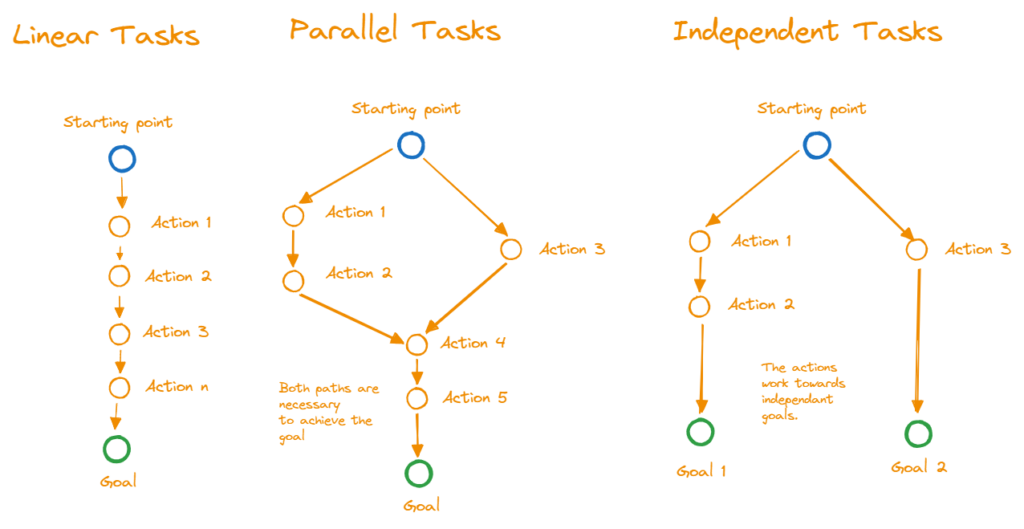
A linear dependency can remain implicit in a checklist: complete one line, then move to the next.
- [ ] Export the image
- [ ] Upload the image
- [ ] Add alt text
The sequence itself carries the relationship.
A task should gain its own note when it depends on several parallel actions, when several later tasks depend on it, or when the dependency must be queried and monitored independently.
For example, publishing an article may require the final text, an approved image and a scheduled newsletter. These inputs can progress separately. “Publish article” is no longer merely the next checkbox in a line; it is a convergence point in the workflow.
The action may need to be handed over
Handovers expose missing context with almost supernatural efficiency. An action that seems perfectly obvious while it lives in your head can become surprisingly mysterious as soon as another person has to perform it.
If I know that work will be handed over, I prefer to describe the desired result clearly and provide the relevant context, constraints, links and current state. A task note can serve as that transfer package.
I do not always know in advance which tasks I will delegate. That is another reason promotion should remain easy: when responsibility changes, a checkbox can become a task note without rewriting the surrounding workflow.
The deeper principle is to hand over the object or outcome, not merely an isolated command; that deserves an article of its own. For the present purpose, the practical rule is simpler:
If another person must understand, manage or report on the action independently, give it an independent note.
The action starts a new project phase or milestone
Project phases and milestones often change the meaning of the work around them. Responsibilities shift, new stakeholders enter, deadlines become visible and different completion criteria apply.
Drafting and publishing an article may initially feel like one continuous effort. Once publication involves an editor, a release date, website formatting, newsletter text and social posts, it has become a separate work package; no matter how optimistically the original checklist suggested otherwise.
Plan first, perfect later
The correct level of detail is not always visible when work begins. Fortunately, it does not have to be.
When I first create an object note, I often write down all actions I can currently foresee as checkboxes. As the work becomes clearer, I turn some of them into separate task notes or subtasks. The TaskNotes plugin supports this workflow directly by converting an inline checkbox into a task note.
This is not a planning failure. It is planning responding to new information.
Robert Nef described planning as replacing chance with error [§ Nef 1973]. The useful part is that an error can be observed and corrected. A system should therefore make changing the plan cheap instead of demanding perfect foresight at the moment of capture.
The reverse is also possible. If two task notes end up sharing the same state, properties and work session, their remaining checks can be combined under one note. If they diverge again later, split them again. Task granularity is a working decision, not a blood oath.
Guidelines
When the distinction remains unclear, I use some guidelines that might also be helpful to you:
| Topic | A checkbox is usually enough when… | Create a task note when… |
|---|---|---|
| State | open and done are sufficient | it can be waiting, blocked, delegated, in progress or under review |
| Context | one line and the containing note explain the action | more information is needed to begin or resume it |
| Resumption | it will be completed in the current session | it may have to survive an interruption |
| Relationships | it belongs mainly to the current note | it must connect to several objects, people, tasks or dependencies |
| Properties | it shares the surrounding work’s dates, priority and responsibility | it needs any of those properties independently |
| Handover | the current worker will complete it | another person may need to understand or manage it |
| Afterlife | it becomes irrelevant once completed | its progress, decisions or result should remain traceable |
One strong “task note” answer (or several weaker ones) is usually enough to justify promotion. If every answer points back to the surrounding note, keep the checkbox and get on with the work.
Notice what the table does not ask: Will this take more than an hour? Duration can be useful for planning, but it does not determine the right representation. Independent manageability does.
Outro
Checkboxes minimize organizational cost. Task notes maximize independent manageability. Neither is the superior form of task; they operate at different levels of work.
Use a checkbox while an action can safely inherit its context, state and relationships. Give it a note when it needs an identity, lifecycle or history of its own. And when you cannot tell yet, start small and promote later. Also:
Use the least complex representation that can hold the work reliably.
Your laundry probably does not need YAML; your client handover does.
Sources
| Key | Citation |
|---|---|
| § Carpenter 1990 | Carpenter, P. A., Just, M. A., & Shell, P. (1990). What one intelligence test measures: a theoretical account of the processing in the Raven Progressive Matrices Test. Psychological review, 97(3), 404. |
| § Cowan 2012 | Cowan, N. (2012). Working memory capacity. Psychology press. |
| § Kersten 2006 | Kersten, M., & Murphy, G. C. (2006, November). Using task context to improve programmer productivity. In Proceedings of the 14th ACM SIGSOFT international symposium on Foundations of software engineering (pp. 1-11). |
| § Nef 1973 | Nef, Robert. Planung ersetzt Zufall durch Irrtum. 1973. |
Leave a Reply